Focusflow.ai
AI-powered, ADHD-friendly task manager using energy data and dopamine cues to create bite-sized steps with predictive scheduling.
Work With Your Brain, Not Against It
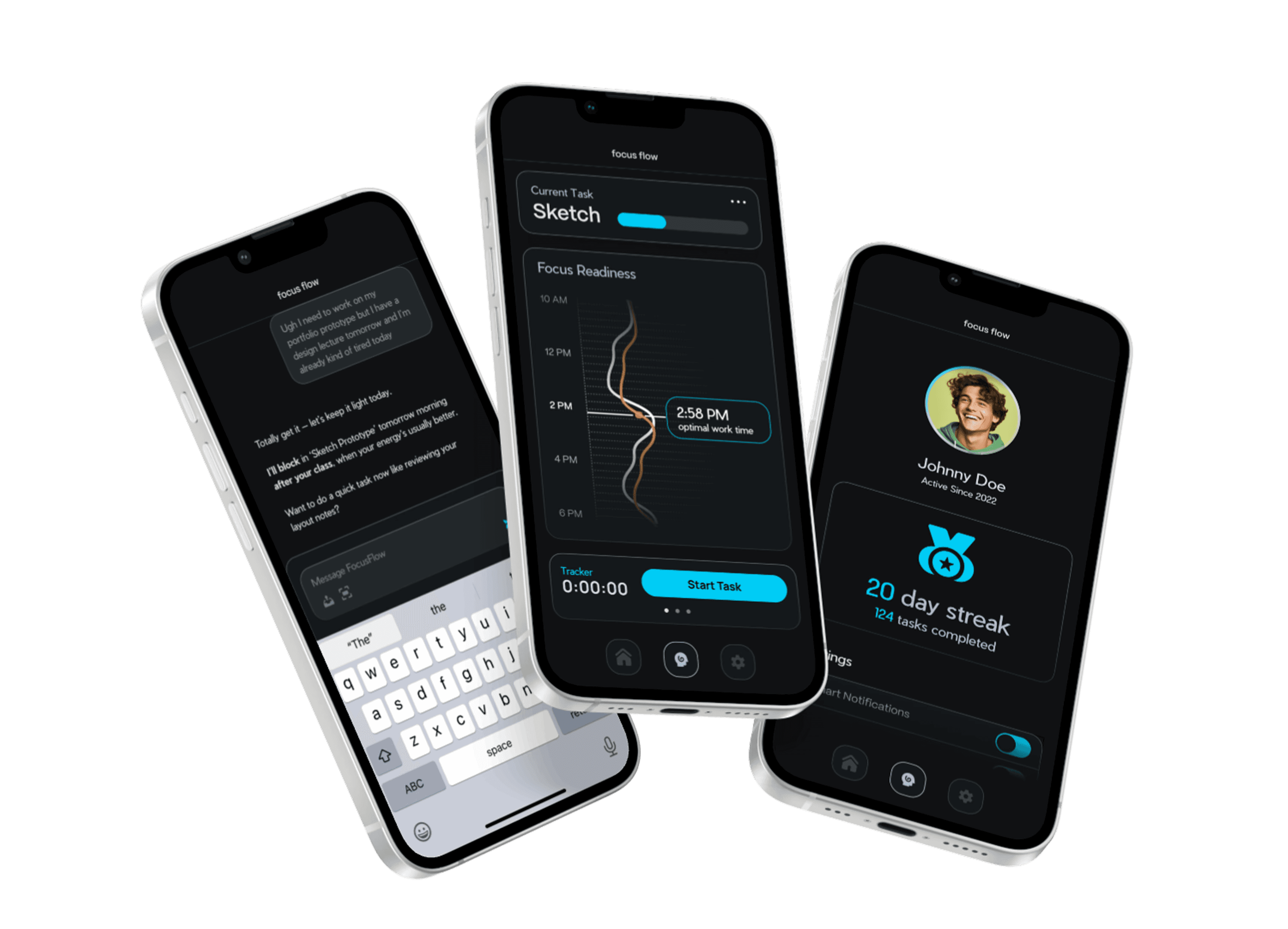
The Focus Readiness Gauge helps you spot when your mind is ready to shine—and when it’s time to take a breather. No pressure, no guilt. Just clear, simple cues so you can plan your day around your natural rhythm.
Keep Your Flow, Lose the Friction.
Forget copying tasks by hand. Snap a photo, send a message—Focusflow parses it, slots it in, and keeps you focused on what matters now.
Team
Rio Ysabelle Mabbayad
Research, UX Design, Prototyping
Joanna Jurczenko
Research, Usability Testing, Brand Identity
Course
User Experience @ HfG Schwäbisch Gmünd
Semesters 4 & 6
Instructor
Dominik Witzke
User Experience
FocusFlow.ai is a research-driven mobile app designed to help neurodivergent users—particularly those with ADHD/ADD—tackle their to-do lists with less anxiety and more focus. Responsible for the research, UX design, and prototyping over a semester-long course, I led the creation of an AI-powered productivity system that automatically structures projects, estimates realistic timelines, and adapts workflows to each user’s energy patterns, calendars, and health data.
Problem Discovery
ADHD affects millions of people, but what often goes unseen is the daily experience behind the diagnosis—racing thoughts, inconsistent motivation, tool fatigue, and the constant pressure to “just get things done.”
Many people with ADHD rely on multiple apps, reminders, and workarounds, yet still feel overwhelmed or unable to maintain focus. These gaps create frustration, missed deadlines, and emotional strain that impacts school, work, and personal life.
For this project, we wanted to understand why existing productivity tools fail neurodivergent users and where task management truly breaks down. Our goal was to design a system that supports focus, reduces overwhelm, and intelligently adapts to each person’s cognitive and emotional rhythms.
User Interviews
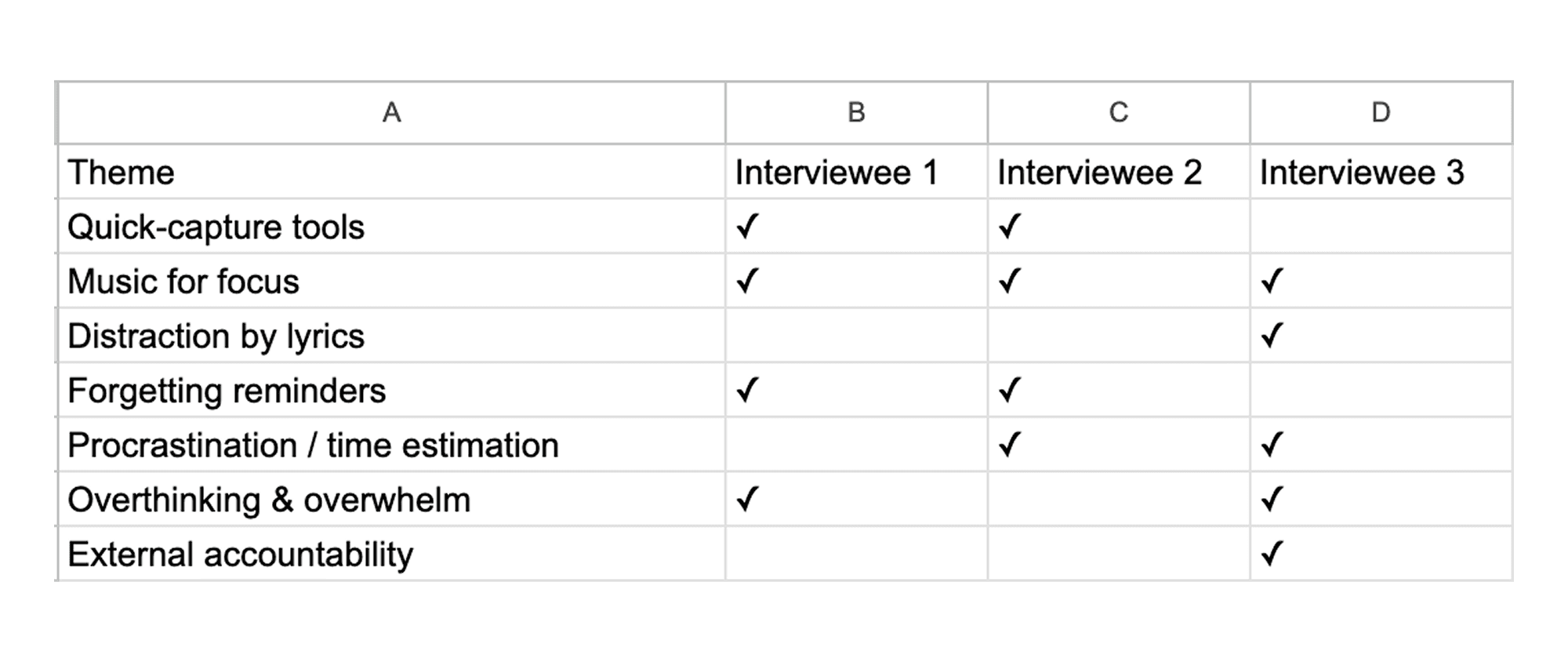
We spoke with ADHD users to understand where task management breaks down. Through conversations, we uncovered pain points like racing thoughts, overwhelm, and distractibility, then traced them back to root causes—noise, sleep issues, and time gaps—that pointed us toward early design opportunities.

We spotted recurring themes across interviews: quick-capture tools, music for focus, lyric distraction, forgetting reminders, procrastination, overthinking, and a need for external accountability.
What We Still Don't Know
Affinity Mapping — Uncovering Core Barriers
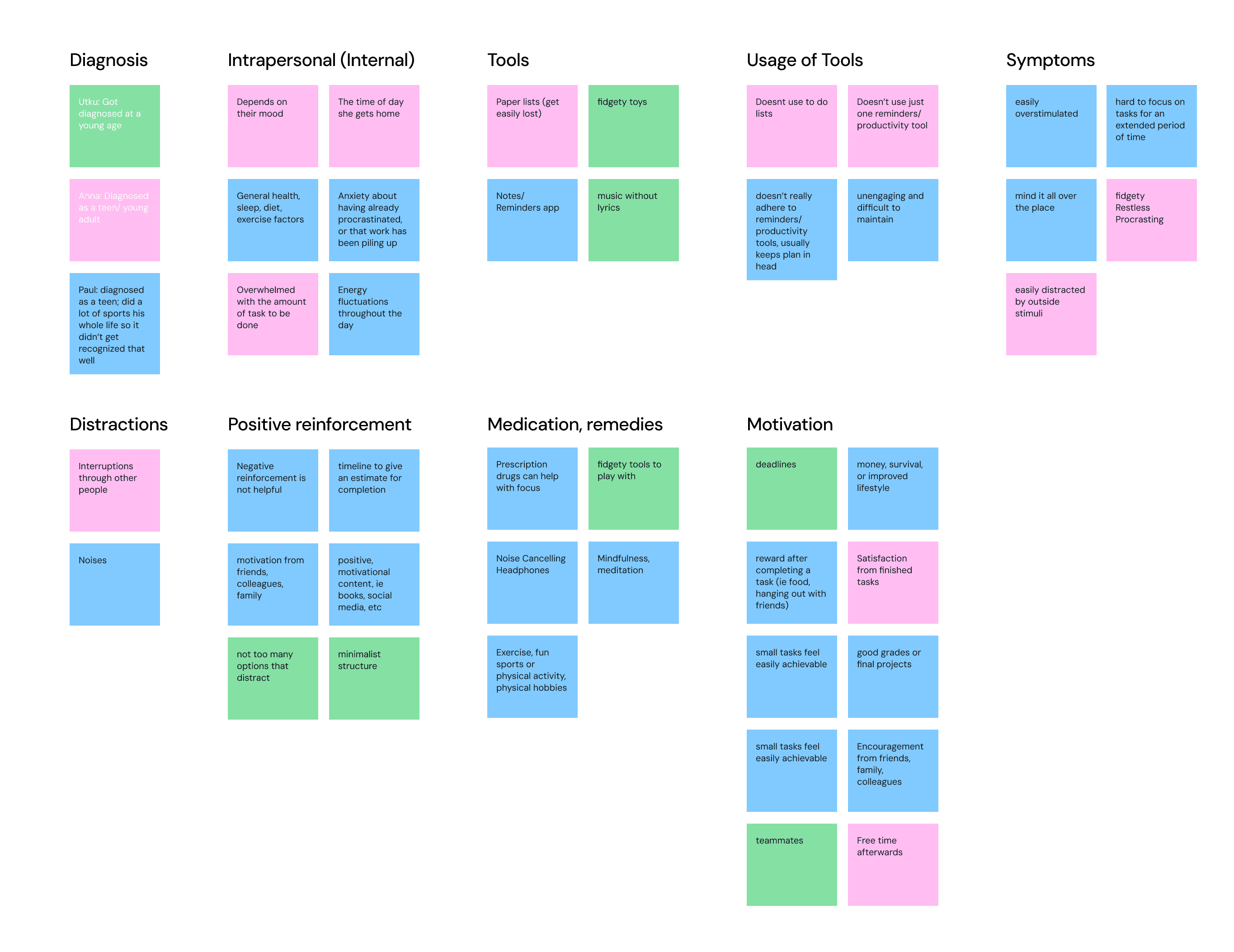
We organized user quotes into known and newly identified thematic clusters—Diagnosis, Intrapersonal Factors, Tools, Usage Patterns, Symptoms, Distractions, Reinforcements, Remedies, and Motivation—then drew connections between pain points (like racing thoughts or tool fatigue) and root causes (noise sensitivity, time-management gaps, sleep issues). This visual map helped us pinpoint the highest-impact barriers to focus and directly informed which features to prioritize.

Barrier Analysis (Cause & Effect Mapping)
To surface the true drivers of ADHD-related friction, we grouped user pain points—racing thoughts, overwhelm, distractibility—onto digital sticky notes and then traced each back to its root cause, such as noise sensitivity, sleep disruption, and time-management gaps. This structured mapping clarified which barriers to tackle first and guided our feature prioritization.

POV Synthesis — Constructing the User Profile
To surface the true drivers of ADHD-related friction, we grouped user pain points—racing thoughts, overwhelm, distractibility—onto digital sticky notes and then traced each back to its root cause, such as noise sensitivity, sleep disruption, and time-management gaps. This structured mapping clarified which barriers to tackle first and guided our feature prioritization.

→ between 18-35 years old
→ Neurodivergent individuals
→ Students & Professionals
→ Anyone who struggles with productivity
User Story Mapping
By illustrating in detail an example story of the users daily life and struggles, we were able to more accurately ideate how our product fits into their lives and addresses their pains, needs, and goals.

Ideation — Brainstorming solutions to reduce overwhelm
Our “How Might We” workshops distilled four core solutions: automate project breakdowns into bite-sized steps, introduce a distraction-free focus mode with timed breaks, deliver gentle, dopamine-boosting celebrations for every small win, and pre-populate tomorrow’s tasks with AI-driven scheduling. These insights directly informed our priority feature set.

6 Hat Method
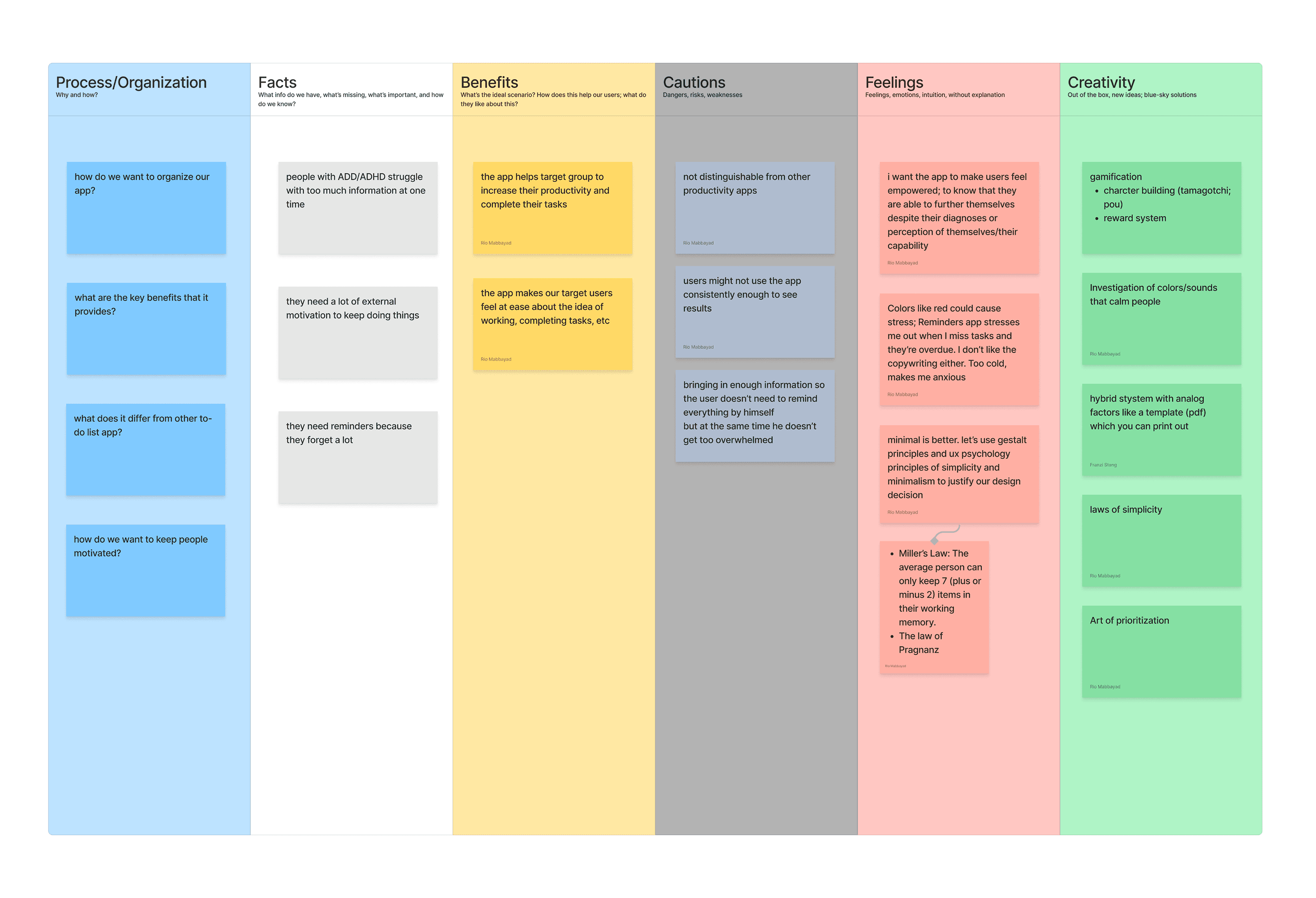
This exercise encouraged structured yet broad thinking by guiding us through one perspective at a time.
The result? We aligned ourselves on key facts yet desired outcomes about how we'd like to serve the users.
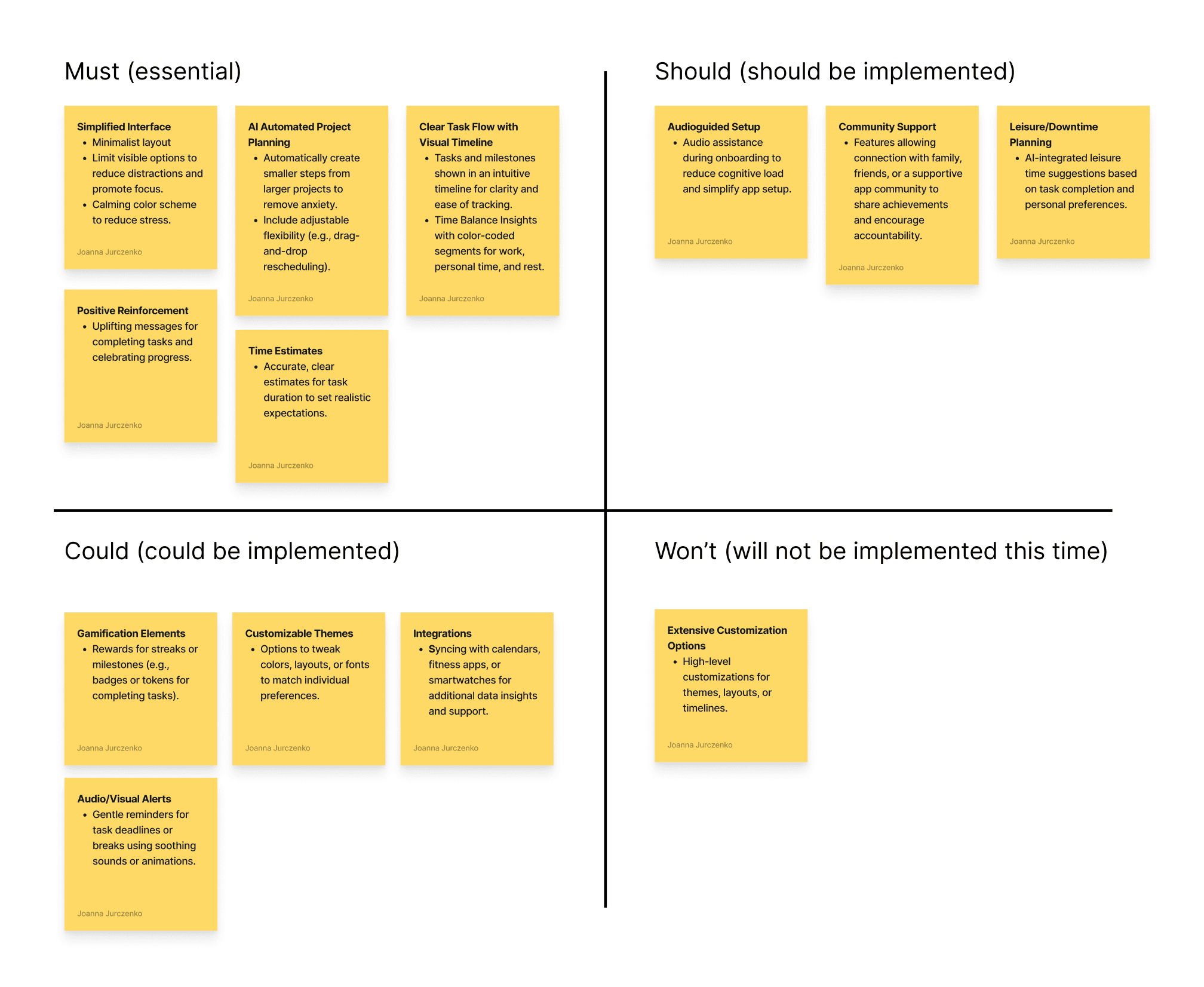
MoSCOW
MoSCoW prioritization, also known as the MoSCoW method or MoSCoW analysis, is a popular prioritization technique for managing requirements. The acronym MoSCoW represents four categories of initiatives: must-have, should-have, could-have, and won't-have, or will not have right now.
Minimal Viable Product Mapping
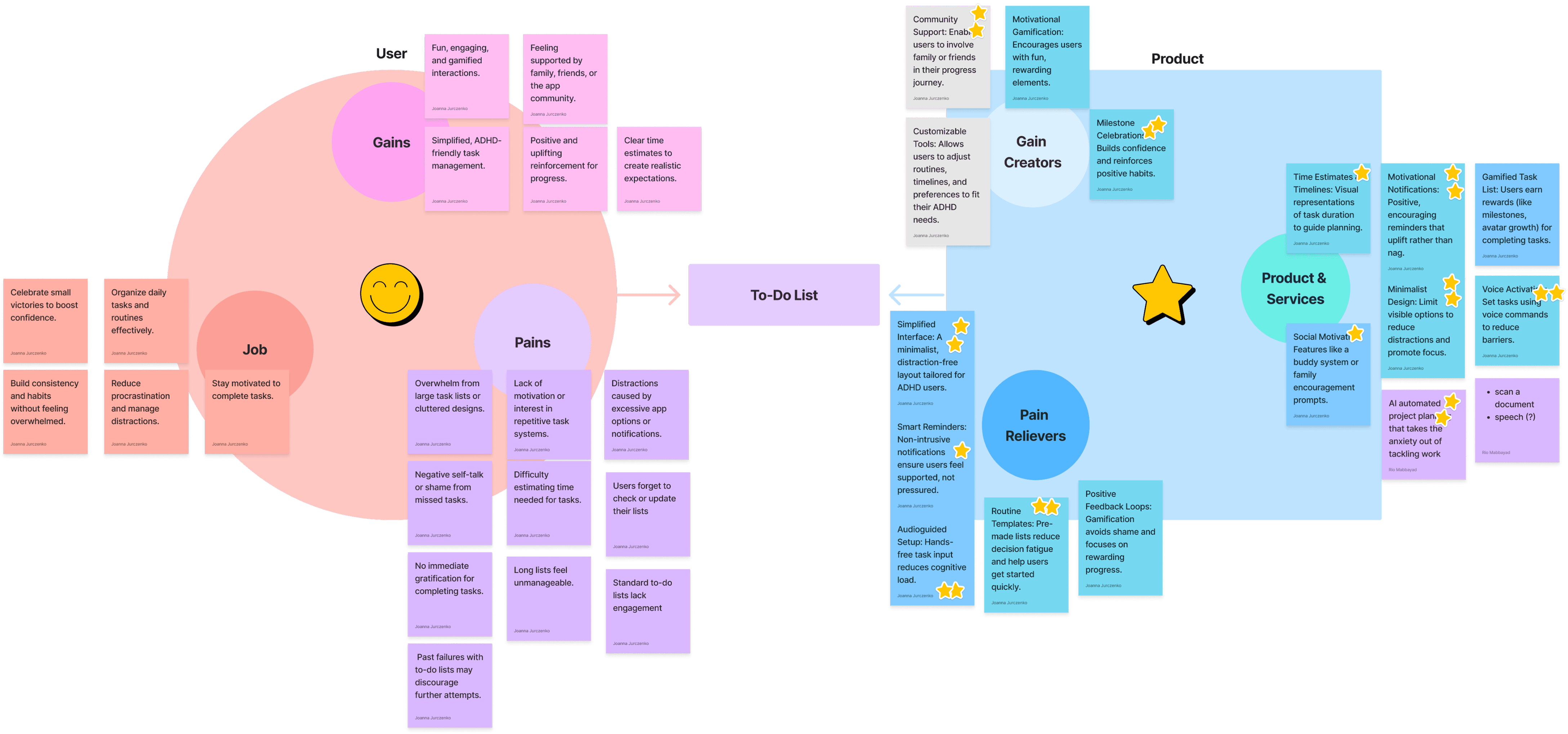
Here we reviewed user pains, gains, and tasks and mapped out how we could create a product that addresses each, retrospectively.
A notable outcome was that we all desired to use AI technology to alleviate their pains.
Design
Since the logomark couldn’t be changed, I built around it—drawing from its diamond shape to create a modular grid system that added structure, symbolism, and scalability to the brand. This grid became more than background logic; it turned the logo into a visual asset that echoes throughout layouts, textures, and design details across the system.


Information Architecture
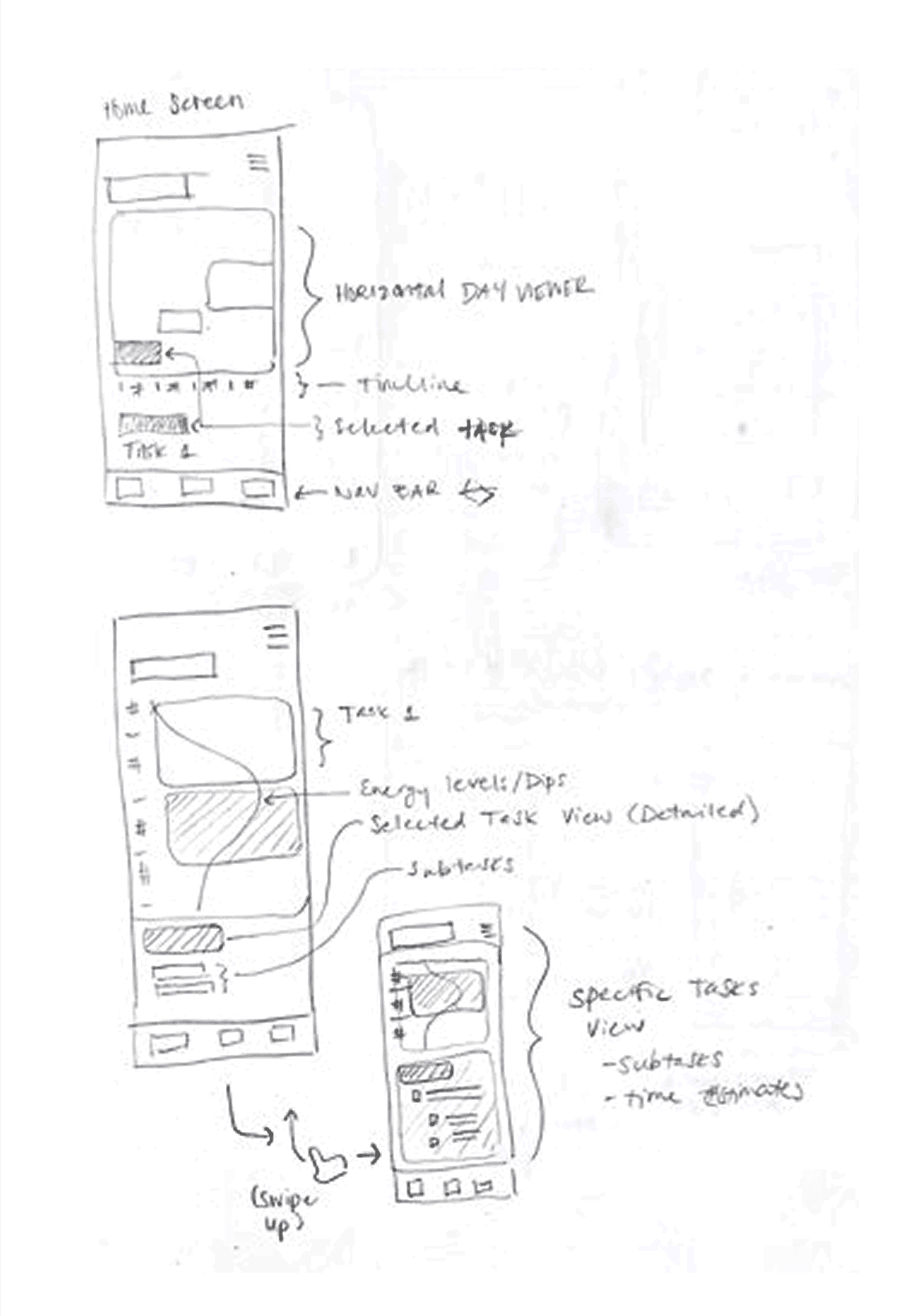
After research and paper prototype testing, we defined the app’s structure to support smooth task flow. The IA connects onboarding, AI-assisted project setup, daily task management, and customizable settings—ensuring clarity, efficiency, and a user-centered experience.

Design Decisions
Guided by our research and user feedback, we made intentional design choices to reduce cognitive load for ADHD users.
Millers Law: ≤ 7 items per page
→ Keeps content digestible and avoids cognitive overload.
Calm Colors
→ Reduces visual overstimulation and supports focus.
Open, breathable heirarchy
→ Guides attention and lowers decision fatigue.
Clean & Minimal Typography
→ Improves readability and reduces cognitive load.

High Fidelity — Round 1
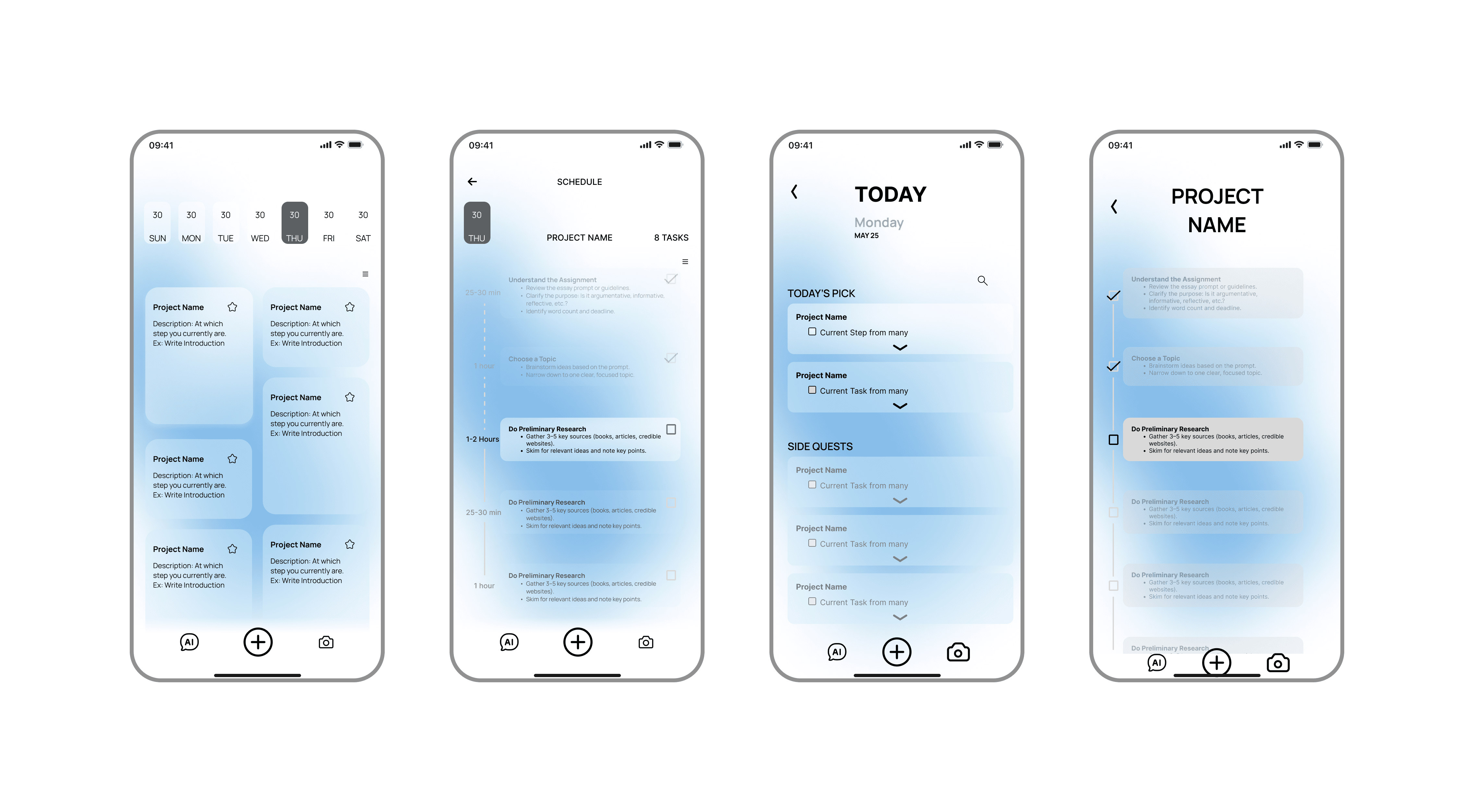
We split functionality across two screens for focus and flexibility. The Home view shows one top-priority task with a progress bar and energy-based time estimate to minimize distractions. The Chat view holds the AI assistant for full project breakdowns, edits, and rescheduling. This separation keeps “what’s next” front and center, while giving users control in a dedicated space. Rounded cards, ample white space, and subtle animations reinforce progress and small wins.
High Fidelity — Round 2
We learned from heavy-ADHD users that they wanted more native tools to complete AI-scheduled tasks and less friction between the AI chat and task viewer. In response, we merged chat into the Home view so the Gantt-style roadmap updates in real time, reducing context-switching. We also added a Dopamine Gauge to predict optimal focus windows using user patterns and optional health data, plus an integrated task timer to provide structure and maintain flow.

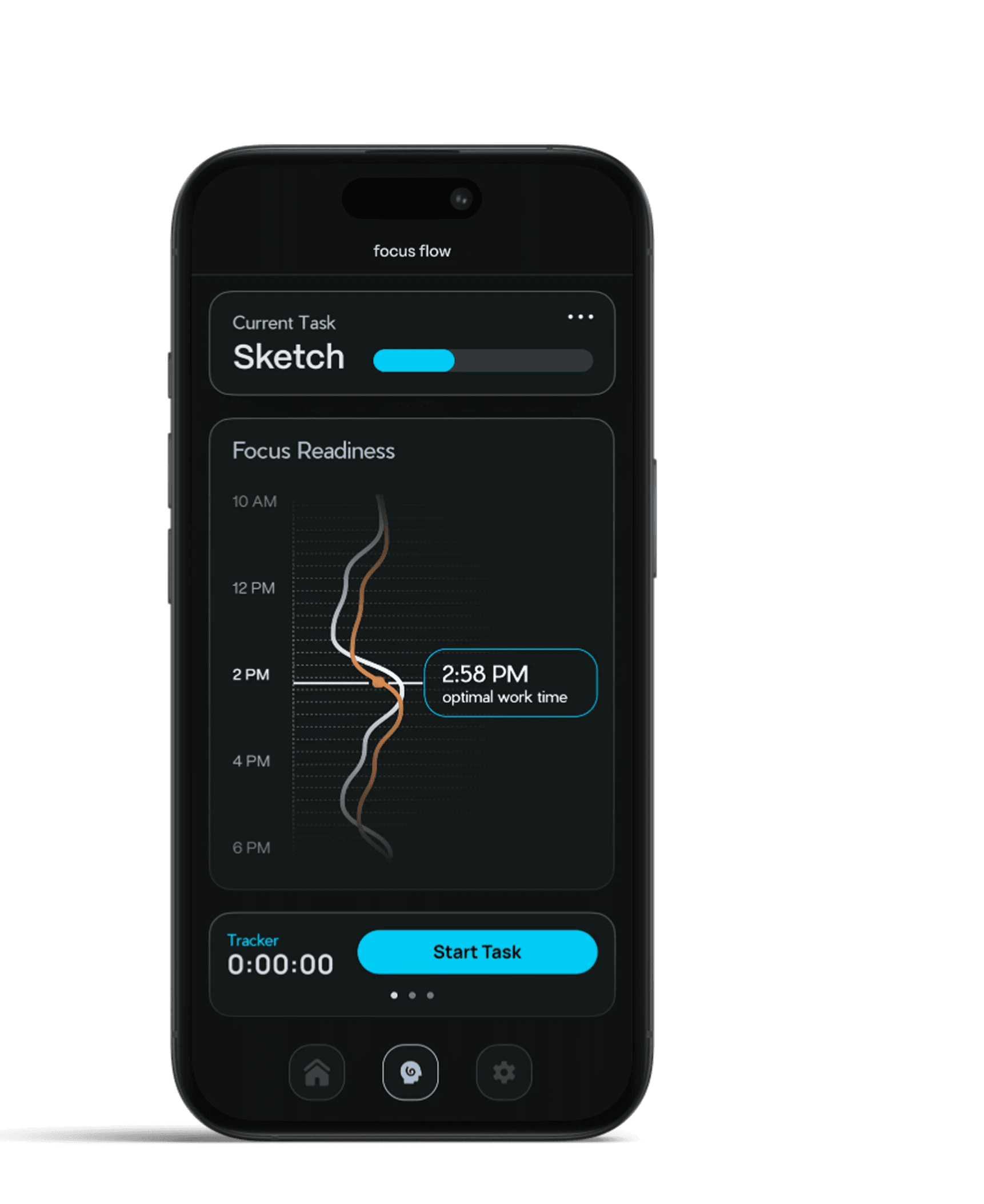
Gauging the user's Optimal Work Time
The Focus Readiness Gauge visualizes your personal energy patterns over the day—combining historical usage data, optional health-sensor inputs (like sleep and heart-rate), and big-data heuristics to predict when your attention will peak or dip. At a glance, you can see upcoming “high-focus” windows and low-energy stretches. Tapping any point on the timeline surfaces an AI-generated suggestion—such as “skim lecture slides at 4 PM” or “review notes at 2 PM”—so you can plan tasks when you’re most primed to succeed.
Contextual Capture — From Slack Messages & Photos to Your Plan
In the AI chat, users can snap a photo of notes, whiteboards, or printed materials—and the app’s computer‐vision model automatically parses key tasks and deadlines. As soon as the image is processed, your Home view’s three-day Gantt chart refreshes in real time, inserting newly extracted steps into the timeline. This seamless photo-to-plan workflow reduces manual entry, preserves your momentum, and keeps the focus on what’s next—no context switches required.

Focusflow.ai
Bite-Sized Tasks. Big-Time Focus.